Choosing the right Kubernetes deployment strategy can be the difference between smooth scaling and a production meltdown. As more teams move their workloads to Kubernetes, understanding how to deploy apps efficiently without downtime is a must.
In this article, we’ll break down the 8 Kubernetes deployment strategies you need to know. Whether you’re pushing your first app or rolling out updates to thousands of users, we’ll walk you through how each deployment strategy works, complete with examples using kubectl, YAML files, and real-world use cases.
Let’s get into it.
What Is a Kubernetes Deployment?
A Kubernetes deployment is a higher-level abstraction that helps you manage and automate updates to your applications running on pods. It’s not just about spinning up a container, it’s about maintaining your app’s desired state over time.
When you create a deployment in Kubernetes, you define a few key things in your deployment YAML file:
- The number of pod replicas you want
- The container image to run
- How Kubernetes should update the pods (your deployment strategy)
Behind the scenes, the deployment controller continuously monitors your current state and makes adjustments to match your spec. This means your Kubernetes deployment object handles everything from scaling pods to rolling back a failed update, all within the same Kubernetes cluster.
Think of deployments as the brains behind rolling updates, version control, and automated rollbacks. They make your infrastructure smarter and your team’s life easier.
How to Create a Kubernetes Deployment (with YAML + kubectl)
kubectl) or defining it in a YAML file. Both methods are widely used in production. Option 1: Create a deployment using kubectl
kubectl create deployment nginx-deploy --image=nginx
Option 2: Create a deployment using a YAML file
					apiVersion: apps/v1
kind: Deployment
metadata:
  name: nginx-deployment
spec:
  replicas: 3
  selector:
    matchLabels:
      app: nginx
  template:
    metadata:
      labels:
        app: nginx
    spec:
      containers:
        - name: nginx
          image: nginx:1.21
          ports:
            - containerPort: 80
This YAML file defines the Kubernetes deployment object that runs three replicas of an nginx pod, exposes port 80, and ensures all replicas stay available during updates.
Once your file is ready, run:
kubectl apply -f deployment.yaml
Kubernetes will take it from there, creating pods, maintaining your desired number of replicas, and tracking the deployment status.
Whether you use kubectl or a deployment.yaml file, the goal is the same: reliably run and update your applications with zero downtime.
8 Kubernetes Deployment Strategies You Should Know
There’s no one-size-fits-all deployment strategy in Kubernetes. The right approach depends on your app’s complexity, the risk you’re willing to take, and how fast you need to roll out new features without breaking production.
Below are 8 powerful Kubernetes deployment strategies to help you plan safer, smarter releases using kubectl, deployment YAML files, and proper pod management.
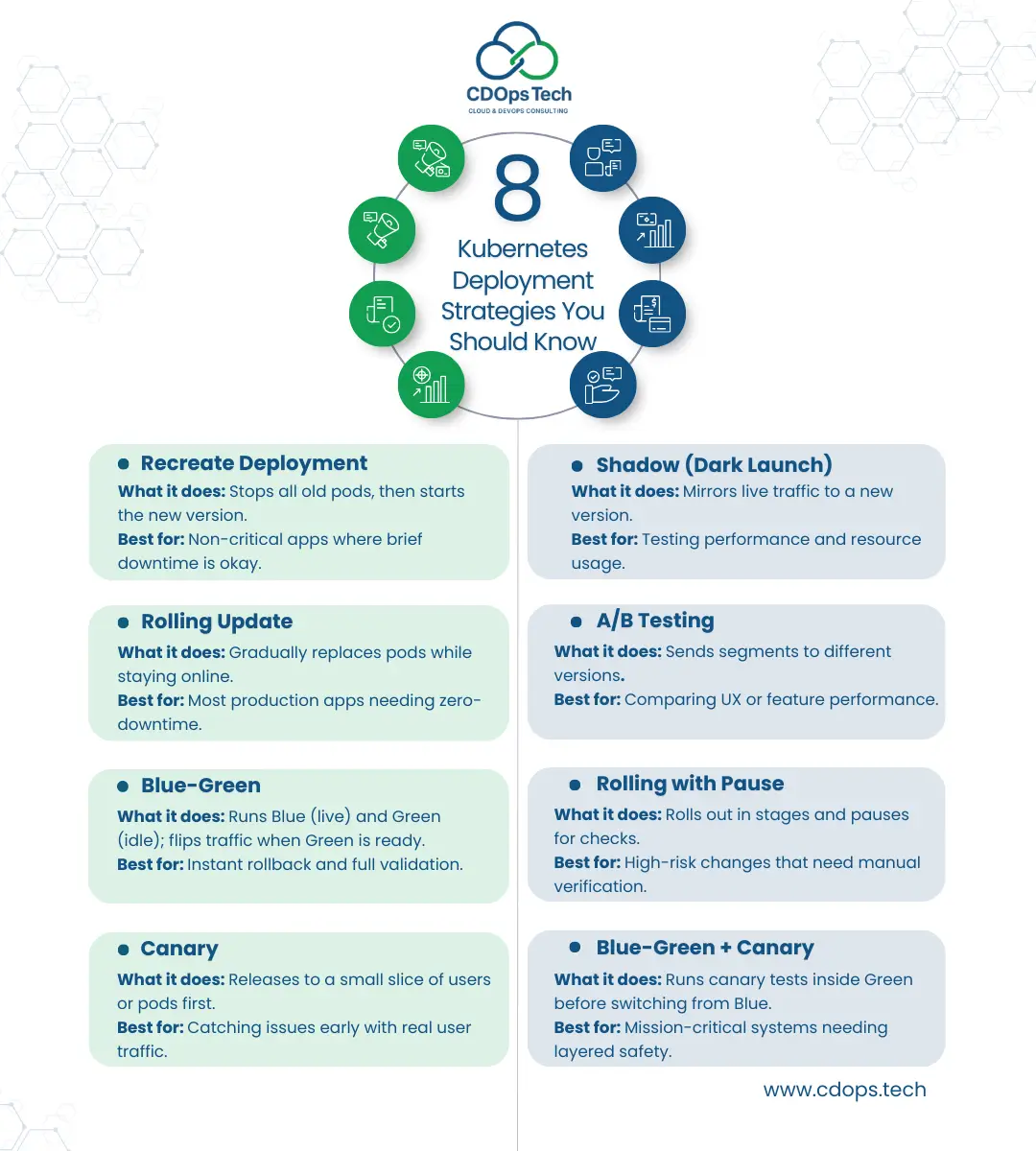
1. Recreate Deployment
This is the most basic deployment strategy, Kubernetes terminates all existing pods before spinning up the new ones. It’s simple but comes with downtime.
Use when:
- You can afford brief downtime
- The workload doesn’t require high availability
spec.strategy.type: Recreate. 2. Rolling Update Deployment
The default update strategy for most Kubernetes deployments, this gradually replaces pods with new versions. It minimizes downtime and supports rollback if needed.
Use when:
- You want a balance between safety and speed
- You need zero-downtime deployments and services
Customize the rollout in your deployment spec using maxSurge and maxUnavailable.
3. Blue-Green Deployment
Two environments: one active (Blue), one idle (Green). You deploy to the Green, test it, then switch traffic from Blue to Green.
Use when:
- You need instant rollback
- Your app requires full validation before release
You can manage Blue-Green via routing tools or separate Kubernetes services for each environment.
4. Canary Deployment
Roll out your Kubernetes deployment to a small percentage of users or pods before full launch. Ideal for detecting issues early.
Use when:
- You want to test updates on a subset of users
- You need gradual exposure with real feedback
Canary strategies often involve traffic splitting and advanced tools like service mesh.
5. Shadow Deployment
Also called “dark launch,” this deployment strategy sends live traffic to a new version without exposing it to end users.
Use when:
- You want to test how a new deployment handles real-world traffic
- You’re validating resource usage or performance
Shadow deployments don’t replace old pods, they run alongside them without disrupting user experience.
6. A/B Testing Deployment
Route traffic to different versions based on user attributes or environments. Unlike canary, this strategy compares multiple versions of an application at once.
Use when:
- You want to test features across different audiences
- You rely on measurable performance data
A/B tests often require integration with feature flag tools and custom Kubernetes service logic.
7. Rolling with Pause
Start a rolling update, but pause between stages to manually inspect the deployment status or test edge cases.
Use when:
- You need tighter control during rollout
- You’re deploying sensitive updates
This strategy is easily managed via kubectl rollout pause and resume.
8. Blue-Green with Canary
A hybrid strategy combining canary deployment within the Green environment before switching completely. It gives you the best of both worlds.
Use when:
- You want staged validation before full switch
- You need layered safety and rollout control
It’s more complex but powerful for mission-critical Kubernetes environments.
How to Write a Deployment YAML File
Writing a clean, effective deployment YAML file is a fundamental skill for managing a successful Kubernetes deployment. This file defines your app’s desired state, guiding Kubernetes in how to deploy, scale, and maintain your application through a declarative configuration.
A basic deployment YAML includes key fields like apiVersion, kind: Deployment, metadata, and spec. The spec is where the magic happens, it tells Kubernetes how many pods to run (replicas), what container image to use, and how to manage the deployment strategy.
Here’s a simple example of a Kubernetes deployment YAML file:
					apiVersion: apps/v1
kind: Deployment
metadata:
  name: nginx-deployment
spec:
  replicas: 3
  selector:
    matchLabels:
      app: nginx
  template:
    metadata:
      labels:
        app: nginx
    spec:
      containers:
      - name: nginx
        image: nginx:1.21
        ports:
        - containerPort: 80
This YAML file tells Kubernetes to deploy 3 pods running the NGINX container. The selector ensures replicaSets match the correct pods, while the template defines how each pod should be configured.
When you run kubectl apply -f deployment.yaml , Kubernetes creates the deployment object, spins up the desired number of pods, and monitors them based on your deployment spec.
Advanced deployment configurations can include update strategies, resource limits (e.g., CPU and memory), environment variables, and lifecycle hooks—all defined in the same YAML file to enable complete control over your workload.
Understanding Rollouts and Rollbacks in Kubernetes
Once your Kubernetes deployment is live, managing changes effectively is critical. That’s where rollouts and rollbacks come in. These features help you update your application confidently while minimizing risk to your pods, services, and users.
What Is a Rollout?
A rollout is the process Kubernetes uses to apply a change to an existing deployment, whether you’re updating the container image, changing the number of replicas, or modifying environment variables. The deployment controller tracks the deployment status, ensures pods are gradually updated, and maintains availability.
You can monitor rollout progress using:
kubectl rollout status deployment/nginx-deployment
Behind the scenes, Kubernetes spins up new pods with the updated configuration while safely terminating old pods. This rolling deployment ensures zero downtime when done properly.
What About Rollbacks?
Even the best plans can fail. If something goes wrong during an update, Kubernetes allows you to roll back to a previous revision. This is vital when your new deployment has bugs, performance issues, or incorrect configurations.
Use the following command to roll back your deployment:
kubectl rollout undo deployment/nginx-deployment
The deployment object stores multiple versions of its deployment spec, enabling safe recovery when needed. This helps maintain stability, especially when managing critical workloads in production.
Best Practices for Rollouts and Rollbacks
- Always test your deployment YAML files in staging before pushing to production.
- Use health checks (readinessProbe and livenessProbe) to ensure pods are available before finalizing a rollout.
- Leverage replicaSets and proper selectors to match only the right pods during updates.
- Monitor deployment status closely using both kubectl and observability tools.
Deployments and Services: How They Work Together in Kubernetes
When working with a Kubernetes deployment, it’s not just about running a pod, it’s about ensuring your application is reliably accessible and scalable. That’s where deployments and services work hand in hand.
A Kubernetes deployment object defines the desired state of your application using a deployment spec in a YAML file. This includes the number of pods (replicas), the container image to deploy, and the update or deployment strategy to follow. Kubernetes uses this to create a deployment and manage its lifecycle, ensuring that the correct set of pods is always running.
But deployments alone don’t expose your app to other services or the outside world. That’s the job of a Kubernetes service. While a deployment maintains your workload and ensures your pods are created, a service provides a stable network endpoint to access those pods, no matter how often they are replaced or rescheduled across nodes.
Why You Need Both
- Deployments manage the state and updates of your app, using strategies like rolling updates or recreate.
- Services expose your app, ensuring traffic always reaches the right pods, even during updates or rollbacks.
For example, you might define your deployment using a deployment YAML file, then use kubectl expose deployment to create a service that makes the app accessible on a cluster IP or a public IP via a LoadBalancer.
Key Connections
- The selector in your service must match the labels in your deployment spec to route traffic correctly.
- Kubernetes uses replicaSets behind the scenes to scale pods as defined in your deployment YAML.
- Services remain consistent, even as new versions of the app are deployed, ensuring zero-downtime user experience.
This harmony between Kubernetes deployments and services simplifies management of complex, distributed systems. Whether you’re deploying a simple web server or a large-scale microservices application, understanding how to connect your deployment with a service is crucial for production-ready Kubernetes environments.
Monitoring and Managing Deployment Status
Once you’ve executed a Kubernetes deployment, your job isn’t done. To ensure reliability and uptime, you need to actively monitor and manage the deployment status. This is a key part of the lifecycle of any workload running in a Kubernetes cluster.
After you create a deployment, Kubernetes continuously compares the current state of the pods with the desired state defined in your deployment YAML file. This deployment spec includes critical details like the number of replicas, selector labels, and the update strategy.
Using kubectl rollout status deployment [name], you can track whether your deployment in Kubernetes is progressing or stuck. If something goes wrong, like a failed deployment or an unhealthy pod, Kubernetes provides built-in mechanisms to roll back to the previous stable version. These rollbacks are especially helpful during production updates that impact app performance or availability.
Here’s what Kubernetes monitors automatically for every deployment:
- Pod readiness: Ensures each pod is running and passing health checks.
- ReplicaSets: Confirms the correct number of replicas is available per the deployment spec.
- Deployment strategy compliance: Validates the defined deployment strategy like rolling updates or recreate strategy is functioning as expected.
All of this is possible because a Kubernetes deployment object is declarative. You define the outcome in your deployment YAML, and Kubernetes takes care of reconciling it with what’s actually happening in your cluster. It also monitors cluster resources like nodes, CPU, and memory to help determine how to best place your pods.
To enhance visibility and control:
- Use
kubectl describe deployment [name]to inspect the full deployment spec. - Check the status of associated replicaSets to track how many pods are created or pending.
- Integrate Kubernetes-native tools or dashboards to visualize deployment health in real time.
Ultimately, effective cloud-native deployment requires not just smart deployment strategies, but also continuous insight into how your Kubernetes deployments provide stability, performance, and resilience for every version of your application.
Make Kubernetes Deployments Work for You
Mastering your Kubernetes deployment strategy is key to scaling your applications efficiently. Whether you’re choosing among the 8 Kubernetes deployment strategies or just learning how to create a deployment, understanding how to manage deployment YAML files, pods, replicaSets, and selectors is crucial to delivering reliable updates with minimal risk.
Every Kubernetes deployment object defines the desired state of your application, including the number of pods, the update method, and rollback configurations. And with tools like kubectl, you can deploy, monitor, and even roll back changes across your Kubernetes service with confidence.
But deploying isn’t just about YAML syntax, it’s about choosing the right deployment strategy, adapting to changing workloads, and making the most of advanced deployment strategies within your infrastructure.
At CDOps Tech, we help businesses simplify and scale their cloud-native applications. From your first deployment to managing complex deployment specs, we guide you through modern deployment in Kubernetes that meets the demands of today’s infrastructure.
Whether you’re exploring Kubernetes deployments vs. traditional approaches, optimizing deployment YAML, or automating deployments and services, we’re here to help.
Need support with Kubernetes or want to optimize your deployment workflows? Contact CDOps Tech, or Request for a quote for your cloud-native partner for seamless, scalable deployments.